Edit Menu
Perform standard point cloud editing tasks such as cutting, copying, pasting, and deleting individual coordinate rows within your robotic path.
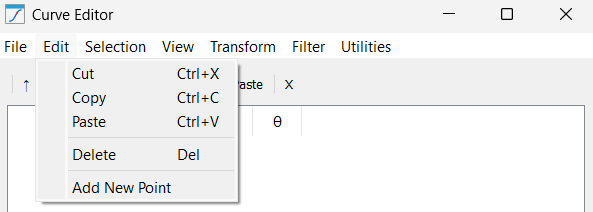
This menu offers common table manipulation tools for handling high-density coordinate data:
1.Cut: Removes the selected points or curves from the list while storing them in the clipboard. This is often used to "re-parent" a segment from one path to another within the same project.
2.Copy: Duplicates the highlighted geometric data to the clipboard. This is useful for replicating patterns (like a bolt hole circle) across multiple locations on a part without re-importing the source file.
3.Paste: Inserts the clipboard data at the current cursor position. If a curve is selected, the points are appended at the end; if a specific row is selected, the points are injected directly below.
4.Delete: Permanently clears the selected data from the editor. This is essential for manual cleaning of "stray" points that often appear at the beginning or end of low-quality CAD exports.
5.Add New Point: Manually creates a new point row with coordinates (0, 0, 0). This allows the user to insert specific coordinates when a precise physical measurement is known but not represented in the 3D model.


