Utilities Menu
Finalize your automation setup by converting curves to robot targets and importing external DXF or program files for simulation.
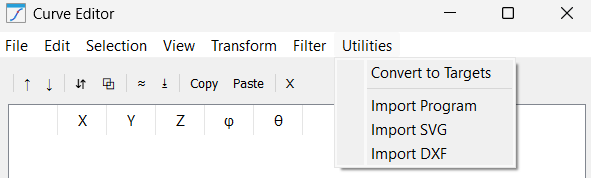
This menu holds integration tools to move your work from the editor to the robot:
1.Convert to Targets: The final step. It takes your refined mathematical data and generates physical "Targets" in the RoboDK tree, ready for a "Curve Follow Project" or "Robot Program".
2.Import Program: An advanced reverse-engineering tool. It extracts the coordinate data from an existing robot program (like a script or .src file) and brings it into the editor so you can smooth or filter a legacy path.
3.Import SVG: Dedicated vector art importer. It translates the Bezier curves of a logo or text into a robotic path, making it the primary tool for laser engraving or decorative painting tasks.
4.Import DXF: The standard engineering interface. It pulls in lines, arcs, and polylines from CAD drawings, maintaining the exact scale and dimensions intended by the designer.


