Add Point(s) On Surface
Add points to the workspace by clicking on 3D models. The script runs a continuous check using a mouse-click listener loop. Every time a user left-clicks on an object mesh, surface data is captured.
Note: The Add Point(s) On Surface feature can be accessed via Utilities ➔ Point Utilities ➔ Add Point(s) On Surface or by clicking on the corresponding icon in the toolbar.
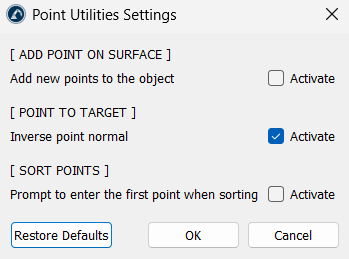
In the app settings, the location of these points can be altered. Activating Add new points to the object embeds the points directly into the selected 3D model's file structure. Deactivating it creates standalone point items in the station tree, automatically named with their exact coordinates.
Note: This add-in’s Settings is located at Utilities ➔ Point Utilities ➔ Settings.