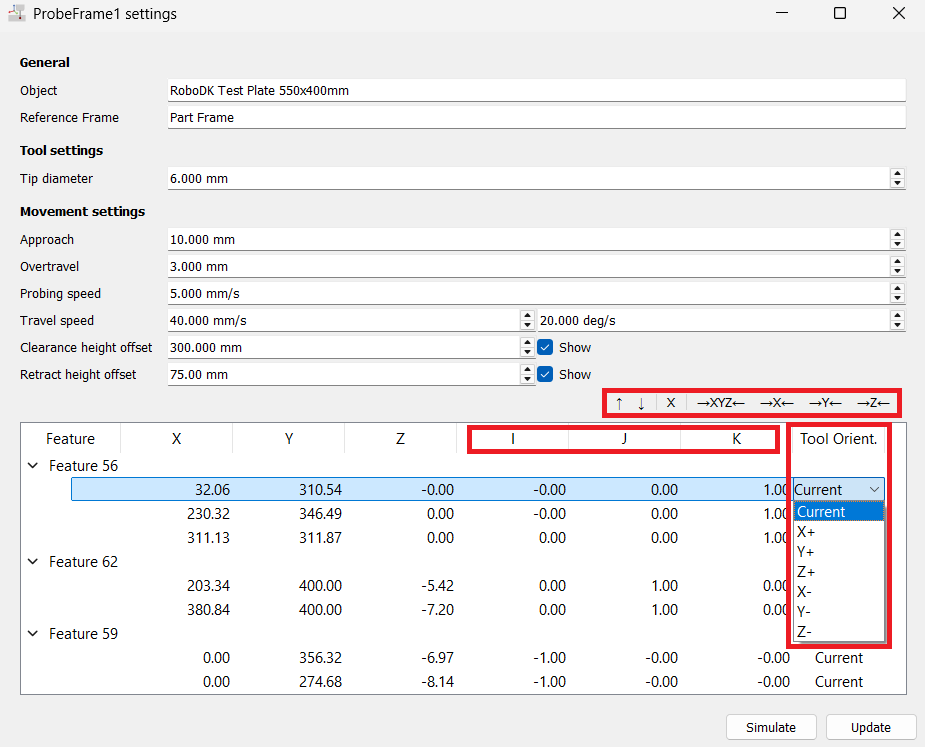
Feature Controls
Simply click on the surface of the object to add new points. You can also:
1.Re-order points using the Up/Down arrows. This modifies the probing sequence and can help the robot take the most efficient path.
2.Delete an existing point or feature from the list using the X button.
3.Center the point on the surface along X, Y, Z, or all three axes.
4.Adjust direction vectors (IJK).
5.Set the tool orientation used to approach each point, in the Tool Orient. column. Current is the default and keeps the orientation the robot has when the program is generated; X+, X-, Y+, Y-, Z+ and Z- align that tool axis with the probing direction, which is what you need for points on a side face.