BobCAD-CAM Install
Follow these steps to install the RoboDK AddIn for BobCAD-CAM. Make sure to use BobCAD-CAM v34 or later.
1.Open the folder BobCAD-CAM plugin folder in RoboDK:
C:/RoboDK/Other/Plugin-BobCADCAM
Alternatively, you can download the RoboDK plugin for BobCAD-CAM:
https://robodk.com/files/upload/BobCAD-CAM-RoboDK-plugin.zip
And mark the plugin as safe:
right click on the ZIP folder, select Properties and check the option Unblock.
2.Run the Install.bat file .
If running the Install.BAT file fails, you can extract the contents of the ZIP folder to the folder:
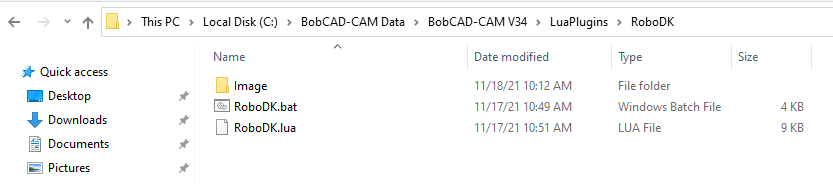
C:\BobCAD-CAM Data\BobCAD-CAM V34
Or your equivalent installation directory. Merge the contents if needed.
3.Restart BobCAD-CAM software.
The plugin install folder should look as shown in the following image.