



11-05-2025, 11:19 AM
Hello,
I am trying to implement a robotic project built by someone else.
The setup contains :
- a robotic arm with a TCP attached to it (2 cameras mounted to it)
- a turntable for objects to be photographed by the cameras

I don't have much experience in RoboDK, but I should be able to :
- replace the robot with our model
- run a python program that checks if the robot can access all the positions required to take the pictures
The problem is that when I try to replace the robot from the basic_setup (that already works), even with the same model, I get an automatic collision between the robot arm and the TCP attached to it.
The next two images are with collision check enabled
This one is the basic_setup :
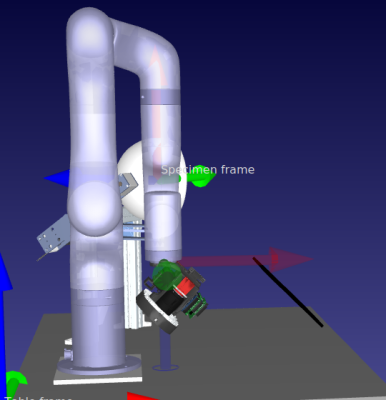
This one is after replacing the robot (Right-click + "Replace Robot) with the exact same model :

I unfortunately can't find anything on this forum explaining my problem or any solution to it.
Thank you in advance for your help
I am trying to implement a robotic project built by someone else.
The setup contains :
- a robotic arm with a TCP attached to it (2 cameras mounted to it)
- a turntable for objects to be photographed by the cameras
I don't have much experience in RoboDK, but I should be able to :
- replace the robot with our model
- run a python program that checks if the robot can access all the positions required to take the pictures
The problem is that when I try to replace the robot from the basic_setup (that already works), even with the same model, I get an automatic collision between the robot arm and the TCP attached to it.
The next two images are with collision check enabled
This one is the basic_setup :
This one is after replacing the robot (Right-click + "Replace Robot) with the exact same model :
I unfortunately can't find anything on this forum explaining my problem or any solution to it.
Thank you in advance for your help
