

Thread Rating:
  • 0 Vote(s) - 0 Average
  • 1
  • 2
  • 3
  • 4
  • 5

Creating a generic item and setting a custom icon in the tree

#1
There is a good chance that I am misunderstanding what the "IconSet" command does.  I am hoping that it will change the icon next to the instruction in the station.  Like this...
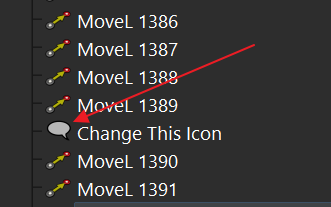
   

I have tried this command:
Code:
currentProg.Instruction(n).setParam('IconSet', "C:/images/LargeNext.png")


Do I need to resize the icon?  I attached the file.  I was hoping that Qt would handle the scaling.

Thanks for your help,
Henry


Attached Files Thumbnail(s)
LargeNext.png   
#2
IconSet applies to custom/generic nodes only, not instructions. These custom/generic nodes must be added using "AddItem". Example: RDK.Command("AddItem", "item name").

Instead, if you want to show a custom icon to a custom instruction you should use customInstruction on a program to add an instruction with a custom command, icon, etc:
https://robodk.com/doc/en/PythonAPI/robo...nstruction
#3
For your information, you can find an example to create a generic/custom item in the tree and create custom parameters for your item here:
Code:
from robodk import robolink
RDK = robolink.Robolink()

# Add a custom item
itm_ptr = RDK.Command("AddItem", "New custom item")
item = robolink.Item(RDK, itm_ptr)

# If name is unique for this generic item you can also do:
# item = RDK.Item("New custom item", robolink.ITEM_TYPE_GENERIC)

# This custom data value will be stored with the RDK file, it works with any type of item (custom or not)
item.setParam("DataValue1", b'Custom data value in bytes')

# Retrieve the data as a byte array
savedData = item.getParam("DataValue1")
print(savedData) # prints b'Custom data value in bytes'

# Set a custom icon (works with generic nodes only)
item.setParam("IconSet", "C:/RoboDK/Icons/about.svg")

# Note: look for events like doubleclick or left click in the eventloop or using the plugin interface

More information here:
https://robodk.com/doc/en/PythonAPI/robo...m.getParam
#4
Thank you Albert - this makes sense.
I like that setting the IconSet parameter accepts a file path instead of having to load the file and provide bytes.  That is a good choice :)
#5
Thanks for your feedback, yes you can provide an image file for the icon (common formats such as SVG, PNG, JPG are supported).

The icon file is saved in memory so it will work on another computer even if the image is not on the same path. I recommend you to use the size of 256x256 pixels which is the size of the other icons in the tree.


Users browsing this thread:
1 Guest(s)