



11-24-2025, 04:43 PM
Hi, I would like to use the Spray_Add() command with the parameter PROJECT to project a spray onto an object, but I'm having difficulty to get it to work.
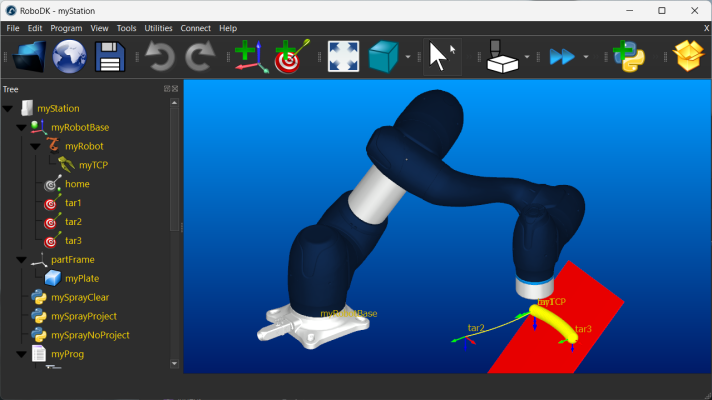
In attached station, running program 'myProg' should illustrate the issue: a Python macro 'mySprayProject' is called to use Spray_Add() with PROJECT, but subsequently moving the robot TCP over the plate shows no sprays. Then macro 'mySprayNoProject' with NO_PROJECT is called, and in this case the sprays do appear at the TCP, as expected.
In other stations, I do have projection working as expected, but I haven't figured out why it doesn't work in this stripped down example. Any ideas?
Two related questions: Am I correctly assuming projection is in the Z-direction of the TCP? And finally, what may cause an undesired delay that sometimes seems to occur after calling Spray_Add, resulting in part of a path not getting sprayed? (Any pause after the Spray_Add command before any subsequent move commands doesn't seem to solve it.)
Kind regards, Maarten
In attached station, running program 'myProg' should illustrate the issue: a Python macro 'mySprayProject' is called to use Spray_Add() with PROJECT, but subsequently moving the robot TCP over the plate shows no sprays. Then macro 'mySprayNoProject' with NO_PROJECT is called, and in this case the sprays do appear at the TCP, as expected.
In other stations, I do have projection working as expected, but I haven't figured out why it doesn't work in this stripped down example. Any ideas?
Two related questions: Am I correctly assuming projection is in the Z-direction of the TCP? And finally, what may cause an undesired delay that sometimes seems to occur after calling Spray_Add, resulting in part of a path not getting sprayed? (Any pause after the Spray_Add command before any subsequent move commands doesn't seem to solve it.)
Kind regards, Maarten
