



10-30-2025, 04:45 AM
Hello,
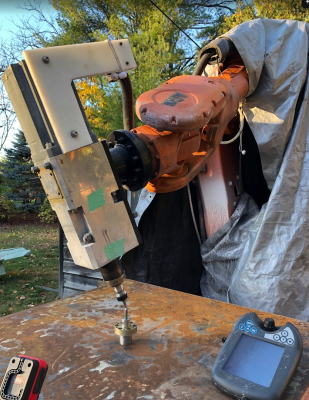
I have an evaluation license and I'm trying to use the tool definition setup page. I'm simultaneously using the same points on the Robot's pendant to teach a new TCP. However the error mean/max displayed by RoboDK do not match the errors displayed on the robot and the calculated TCP is slightly different. I should note that since I only have the evaluation license, I must manually enter the joint values (I was told I couldn't get the ABB driver to test). These are only displayed to 1 decimal point on the pendant. So they are only entered to 1 decimal point in RoboDK.
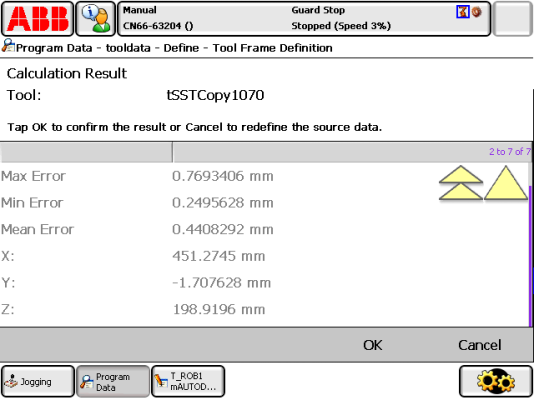
As an example, here is one calculated with 6 points. The min/max/mean error shown on the robot is:
Min: 0.2495628mm
Max: 0.7693406mm
Mean: 0.4408292mm
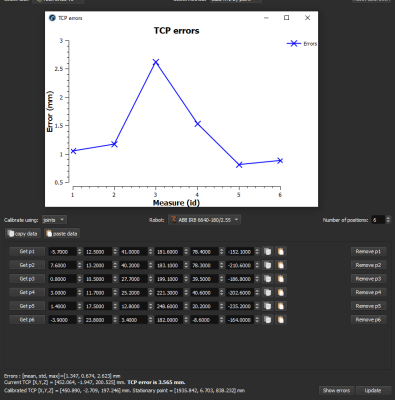
RoboDK
Max: 2.623mm
Mean: 1.347mm
Robot TCP (XYZ): 451.2745mm, -1.707628mm, 198.9196
RoboDK TCP (XYZ): 450.890mm, -2.709mm, 197.246mm
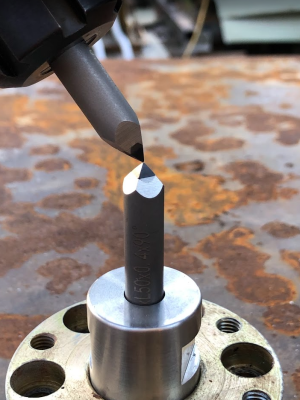
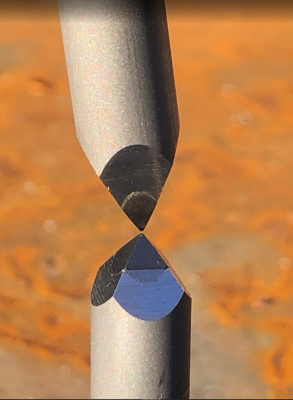
I'm using tools that come to a sharp point with a 0.4mm flat at the tip.
Are the differences I'm seeing due to the fact I'm only entering the joint values to 1 decimal place? I was able to save the points to a file, but they are in ABB format. I was going to try to enter them, but the input boxes will not allow pasting of individual values (the paste routine should be updated to detect a single double value and allow the paste).
station file
 ABB6640 RockBot.zip (Size: 2.8 MB / Downloads: 273)
points used
 TCP_tSSTCopy1070_6points.MOD (Size: 1.26 KB / Downloads: 342)
I have an evaluation license and I'm trying to use the tool definition setup page. I'm simultaneously using the same points on the Robot's pendant to teach a new TCP. However the error mean/max displayed by RoboDK do not match the errors displayed on the robot and the calculated TCP is slightly different. I should note that since I only have the evaluation license, I must manually enter the joint values (I was told I couldn't get the ABB driver to test). These are only displayed to 1 decimal point on the pendant. So they are only entered to 1 decimal point in RoboDK.
As an example, here is one calculated with 6 points. The min/max/mean error shown on the robot is:
Min: 0.2495628mm
Max: 0.7693406mm
Mean: 0.4408292mm
RoboDK
Max: 2.623mm
Mean: 1.347mm
Robot TCP (XYZ): 451.2745mm, -1.707628mm, 198.9196
RoboDK TCP (XYZ): 450.890mm, -2.709mm, 197.246mm
I'm using tools that come to a sharp point with a 0.4mm flat at the tip.
Are the differences I'm seeing due to the fact I'm only entering the joint values to 1 decimal place? I was able to save the points to a file, but they are in ABB format. I was going to try to enter them, but the input boxes will not allow pasting of individual values (the paste routine should be updated to detect a single double value and allow the paste).
station file
 ABB6640 RockBot.zip (Size: 2.8 MB / Downloads: 273)
points used
 TCP_tSSTCopy1070_6points.MOD (Size: 1.26 KB / Downloads: 342)
