Hello Albert,
I have updated to the latest version of RoboDK, despite the fact that the md5 of the installer remains the same, DOCKED mode does work, but:
1) if I open the camera in DOCKED mode, then UNDOCK it, it opens in a separate window (as it should be), but if I close this window by pressing X, it causes the RoboDK to crash

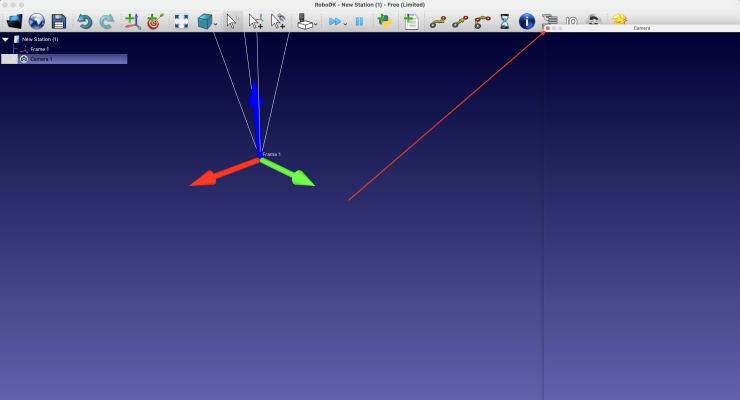
2) By:
Code:
cam_item = self.RDK.Cam2D_Add(camera_frames, 'DEPTH FOCAL_LENGTH=6 FOV=30 FAR_LENGTH=5000 SIZE=960x540')
Not all camera settings will actually be set, until you open the camera settings in the GUI and click OK.
But in this case it helps if you do this:
Code:
cam_item = RDK.Cam2D_Add(camera_frames, 'DEPTH')

params = ["FOCAL_LENGTH=6", "FOV=30", "FAR_LENGTH=5000", "SIZE=960x540"]

for param in params:

    self.RDK.Cam2D_SetParams(param, cam_item)
after such consistent application of the parameters, the window size, FOV, etc. become what they should be.
Some observations about getting an image in DEPTH mode: I tried to get it from a socket and from a file, and then visualizing it.
Like this:
Code:
td = TemporaryDirectory(prefix='robodk_')

tf = td.name + '/temp.grey32'

if self.RDK.Cam2D_Snapshot(tf, cam_item) == 1:

    grey32 = np.fromfile(tf, dtype='>u4')

    w, h = grey32[:2]

    grey32 = np.flipud(np.reshape(grey32[2:], (h, w)))

else:

    raise


#----------------------------------------------

# Display

grey32[grey32 == 0] = 2**32 - 1  # This is for display purposes only! Values of 0 do not have any measurements.

plt.imshow(grey32, 'gray')

plt.show()
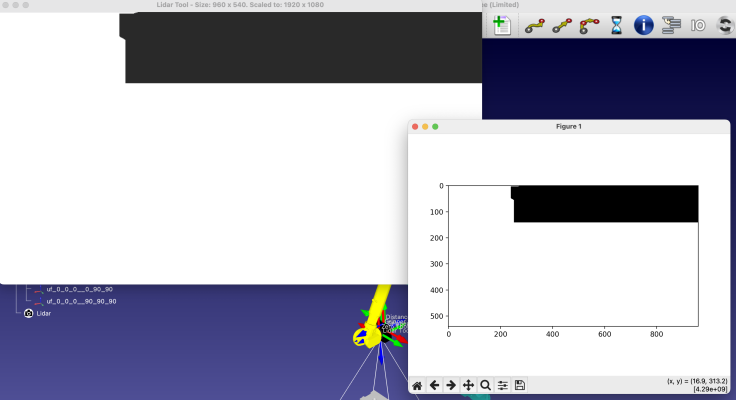
In both cases, the visualization matched what I see in the camera window in RoboDK (cropped image), but if I save the PNG in DEPTH mode, it doesn't look cropped🤔.

Hello Albert,
I have updated to the latest version of RoboDK, despite the fact that the md5 of the installer remains the same, DOCKED mode does work, but:
1) if I open the camera in DOCKED mode, then UNDOCK it, it opens in a separate window (as it should be), but if I close this window by pressing X, it causes the RoboDK to crash
2)
By:
Code:
cam_item = self.RDK.Cam2D_Add(camera_frames, 'DEPTH FOCAL_LENGTH=6 FOV=30 FAR_LENGTH=5000 SIZE=960x540')
Not all camera settings will actually be set, until you open the camera settings in the GUI and click OK.
But in this case it helps if you do this:
Code:
cam_item = RDK.Cam2D_Add(camera_frames, 'DEPTH')

params = ["FOCAL_LENGTH=6", "FOV=30", "FAR_LENGTH=5000", "SIZE=960x540"]

for param in params:

    self.RDK.Cam2D_SetParams(param, cam_item)
after such consistent application of the parameters, the window size, FOV, etc. become what they should be.
Some observations about getting an image in DEPTH mode: I tried to get it from a socket and from a file, and then visualizing it.
Like this:
Code:
td = TemporaryDirectory(prefix='robodk_')

tf = td.name + '/temp.grey32'

if self.RDK.Cam2D_Snapshot(tf, cam_item) == 1:

    grey32 = np.fromfile(tf, dtype='>u4')

    w, h = grey32[:2]

    grey32 = np.flipud(np.reshape(grey32[2:], (h, w)))

else:

    raise


#----------------------------------------------

# Display

grey32[grey32 == 0] = 2**32 - 1  # This is for display purposes only! Values of 0 do not have any measurements.

plt.imshow(grey32, 'gray')

plt.show()
In both cases, the visualization matched what I see in the camera window in RoboDK (cropped image), but if I save the PNG in DEPTH mode, it doesn't look cropped🤔.




