



I installed the Nvidia Jetson version of RoboDK (64-bit) provided on the forum on my NVIDIA DGX Spark GB10. The software can run normally. The Taiwan sales representative told me that I could purchase a USB hardware license dongle, which I did.
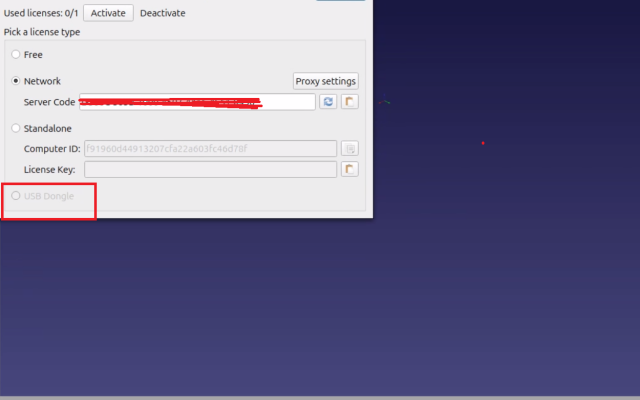
However, after plugging the USB hardware key into the NVIDIA DGX Spark GB10. I found that the software cannot be configured to use the USB KEY (the option is disabled ?). How can this issue be resolved?
Additionally, during testing, I found that after simulating and generating a program for a Yaskawa robot, the program cannot be uploaded to the robot. It seems that there may be an issue with line-ending characters (newline format). This problem does not occur when using the Windows version.
Is there currently a newer version available?
I am currently using the version downloaded from this forum link:
https://robodk.com/forum/Thread-Jetson-a...-supported
However, after plugging the USB hardware key into the NVIDIA DGX Spark GB10. I found that the software cannot be configured to use the USB KEY (the option is disabled ?). How can this issue be resolved?
Additionally, during testing, I found that after simulating and generating a program for a Yaskawa robot, the program cannot be uploaded to the robot. It seems that there may be an issue with line-ending characters (newline format). This problem does not occur when using the Windows version.
Is there currently a newer version available?
I am currently using the version downloaded from this forum link:
https://robodk.com/forum/Thread-Jetson-a...-supported
