


Hi, I have a non planar curve, how to follow it with an ABB robot TCP oriented 90 degrees to curve so we will have different normals throughout one curve layer?
Thread Rating:
Nonplanar Curve Follow Project |

07-13-2026, 08:18 AM
Hello there, the Z axis of the TCP matches the curve normal always. So, by default, the ABB robot should follow the curve with its TCP oriented 90 degrees. If that is not the case, attach your curve file or your RoboDK station and I can check it out for you.

07-13-2026, 10:06 AM
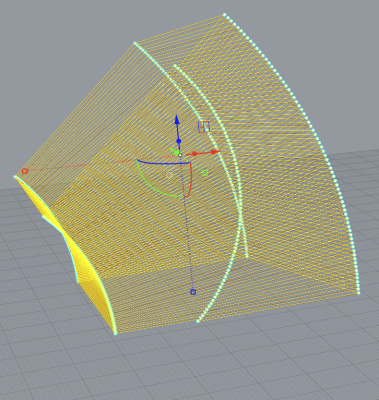
Hi, yes, I have a non-planar curve and all normals are oriented vertically when I load it in RoboDK. Rename the second file curve_robodk.csv (it wasn't allowed to add csv or txt file).
07-13-2026, 10:26 AM
I see the issue.. Would you try using the 'Set Normals' function of our Curve Utilities Add-in? This will help you manipulate the orientation of your curve. I think it would work if you use the Set Normals (Tangent) option and add a value of -90 degree to it.
Download the Add-in from here - https://robodk.com/addin/com.robodk.app.curveutilities Check out its documentation here - https://robodk.com/doc/en/Addin-Curve-Utilities.html
07-13-2026, 08:41 PM
Спасибо за совет — дополнение действительно интересное, но оно не решает проблему — или, может быть, настройки неправильные — я сделал, как вы предложили, и вот что получилось. Есть какие-нибудь идеи?

07-14-2026, 11:21 AM
Вам нужно изначально задавать (или рассчитывать) значения IJK в точках, формирующих кривую
Например, в CAD плагинах при экспорте кривой для этого можно выбрать поверхность(и): https://robodk.com/doc/en/Plugins-CADCAM...ginsCADCAM You need initially to specify (or calculate) the IJK values at the points that define the curve. For example, in CAD plugins, when exporting a curve, you can select one or more surfaces for this purpose: https://robodk.com/doc/en/Plugins-CADCAM...ginsCADCAM
07-15-2026, 06:14 AM
Unfortunately these plugins (for example the one for Rhino) is not supported in MacOS. Anyway, do you have any examples for that? You say I can chose one or more surfaces, but what if I don't have surfaces, I only have a curve, a toolpath?

07-15-2026, 09:04 AM
In this case you can import curves as CSV files or TXT. You can find an example here:
https://robodk.com/doc/en/PythonAPI/exam...ram-xyzwpr By the way we just improved RoboDK for Mac with an Apple silicon build. |
| Users browsing this thread: |
| 1 Guest(s) |
Copyright © 2026 RoboDK Global
Powered by MyBB