Comau is a global leader in advanced automation and robotics. This guide covers Comau robot programming across the company’s portfolio, from native PDL2 code to offline programming in RoboDK.
Comau robot range spans compact industrial models such as the Racer, collaborative robots such as the MyCo family, and heavy-payload arms such as the N220. Across this range, you can approach programming in several ways, from on-robot programming with a teach pendant to offline programming in simulation.
In this guide, we explain each programming method, compare the available options, and highlight key applications and robot models.
Who Are Comau?
Founded in Turin, Italy Comau combines over 50 years of experience with a complete portfolio of high-performance industrial and collaborative robots.
As both a system integrator and a robotics manufacturer, the company has been shaping the evolution of industrial automation since its origins in the automotive sector. From the beginning, Comau integrated complex production lines powered by hundreds of robots and designed to build thousands of vehicles.
Today, Comau brings the same engineering excellence to a wide range of traditional and emerging industries, including those operating in unstructured environments.
The company’s approach goes beyond technical expertise. It is rooted in innovation, passion, and the ability to transform automation challenges into efficient, future-ready solutions.
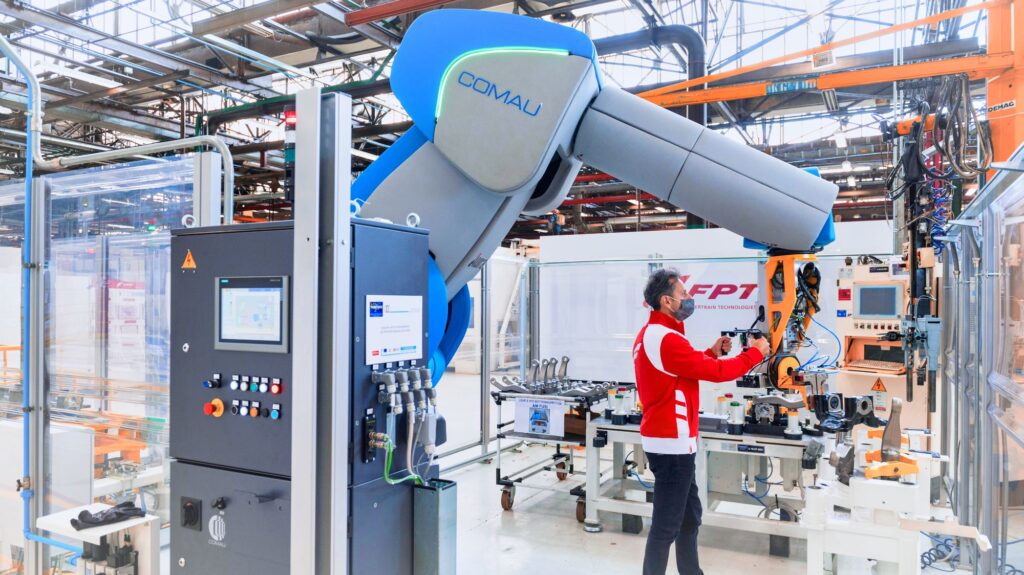
Comau and RoboDK Partnership
With a comprehensive robot portfolio known for reliability, precision, and cost-effective performance, Comau continues to push the boundaries of what robotics can achieve.
This is why the Comau and RoboDK partnership has robotics at its core.
The partnership enables users to simulate, program, and deploy Comau robots more efficiently than ever — accelerating integration workflows and unlocking extra levels of flexibility for both newcomers and automation experts.
Common Applications for Comau Robots
Comau robots are found across many diverse businesses and sectors. From the company’s defining role in automotive manufacturing, it now serves a wide range of industries.
Some common application areas include:
- Food and Beverage Packaging — Robots like the Racer-5 are especially suited to sensitive environments, enabling hygienic handling and packaging of foodstuffs.
- Pharmaceutical Production — Strict contamination controls also apply for pharmaceutical manufacturing, and Comau has solutions specially designed for cleanroom environments.
- Logistics Automation — With the acquisition of logistics company Automha, Comau significantly enhanced its offering of high-performance and scalable solutions, reconfirming and strengthening its Italian roots and operations.
- Renewable Energy Manufacturing — Comau continues to build on its foundational robotic application by bringing its automated assembly expertise into tasks like solar panel installation and hydrogen fuel cell production.
- Shipbuilding and Heavy Industry — With integrated solutions for robotic welding, Comau enables automated welding and inspection of large steel structures suited to marine environments.
With such applications, Comau robots are helping many businesses transform their complex production environments to be faster, more flexible, and more consistent.
Programming Your Comau Robot: The 3 Core Options
There are three basic ways to program a Comau robot: write code in Comau PDL2, use Easy Prog on the TPX Comau teach pendant, or program offline in RoboDK.
With the collaboration between RoboDK and Comau, programming a Comau robot has never been easier. Whatever programming solution you choose, the most important thing is picking one that suits your application and level of expertise.

Here are the 3 core options for programming Comau robots:
1. PDL2 Language (Native Programming)
Most industrial robot brands have their own proprietary programming language, and Comau is no different.
The PDL2 language is the traditional method for programming the company’s industrial robots. This text-based programming language is similar in syntax to Pascal with extra functions to control robotic manipulators.
Programs in PDL2 can be created on the robot’s teach pendant (such as the TP5) or on a computer using Roboshop.
2. TPX Teach Pendant with Easy Prog
Teach pendants have been a cornerstone of industrial robotic programming for decades and they have changed little in all that time.
Comau’s recent addition changes that with their TPX, a teach pendant with added graphical features. The pendant includes a basic 3D simulator to visualize the robot. It also includes the company’s Easy Prog feature, which allows for visual programming without requiring knowledge of PDL2.
3. RoboDK: Simplifying Comau Robot Programming
If you want to really streamline your robot programming, RoboDK provides a flexible way to program, simulate, and deploy Comau robots offline.
By integrating RoboDK into your setup, you gain:
- CAD/CAM Integration — You can import tool paths directly from your preferred design software and export them directly to your Comau robot.
- Offline Simulation — Simulation allows you to validate trajectories, test the robot for reachability, and avoid collisions. Offline programming helps to reduce deployment time with no need to take the physical robot out of production.
- Post-Processing and Direct Control for Comau — With our Comau post processors, RoboDK automatically generates PDL2 robot programs with correct syntax and motion logic. You can even use the real-time drivers to test and fine-tune your programs live on the physical Comau robots.
What Is the Comau C5G Controller?
The Comau C5G is the robot controller that runs many of Comau’s industrial robots and executes PDL2 programs. It handles motion control, inputs and outputs, and communication with the rest of the robot cell.
With high performance and low energy consumption, the C5G includes Comau’s RobotSAFE technology that facilitates safe management of robot motions. With added safety sensors, robots can even operate without physical fences.
The controller also supports simultaneous management of several robots. This allows for multi-robot applications, which are easy to program and simulate within RoboDK.
You can find the C5G post processors for RoboDK in the Library.
Realistic Robot Simulation: Accurate Robot Cycle Times for Comau Robots
RoboDK works as a Comau robot simulator from first design to final working robot cell, including predicting accurate cycle times using Comau’s motion planning software.
Realistic Robot Simulation (RRS) is a standard that allows simulation software to predict accurate cycle times using the robot’s controller software. With our dedicated RRS for Comau Add-in you can quickly analyze path accuracy and cycle times for your Comau program in RoboDK. With it, you gain a clear picture of how the robot will operate in your environment, allowing you to optimize your program in simulation to improve your Comau deployment.
Comau Racer Robots: Racer 3, Racer 5 and Racer 7 Compared
Comau Racer robots are compact, 6-axis Comau robot arms built for fast, precise handling and assembly. The range covers three payload sizes, plus one collaborative variant.
The RoboDK Library includes support for Racer 3, 5, and 7 robots.
This table compares the features and uses for Racer robots, so you can choose the right model for your application:
| Model | Specifications | Best for | RoboDK model |
|---|---|---|---|
| Racer 3 | Payload: 3 kg Reach: 630 mm Repeatability: 0.02 mm | Precise handling, assembly, and measuring and testing in compact cells | [View in library][LIBRACER3] |
| Racer 5-0.63 | Payload: 5 kg Reach: 630 mm Repeatability: 0.03 mm | Handling, packaging and machine tending where you need more payload in the same compact footprint | [View in library][LIBRACER5063] |
| Racer 5-0.80 | Payload: 5 kg Reach: 809 mm Repeatability: 0.03 mm | Handling, dispensing and machine tending across a larger work area | [View in library][LIBRACER5080] |
| Racer 5-0.80 COBOT | Payload: 5 kg Reach: 809 mm Repeatability: 0.03 mm | Shared workspaces, as it switches automatically from industrial to collaborative speed when an operator enters its working area | [View in library][LIBRACERCOBOT] |
| Racer 7-1.4 | Payload: 7 kg Reach: 1,436 mm Repeatability: 0.05 mm | Larger work areas and process tasks such as arc welding, polishing and deburring, and sealing | [View in library][LIBRACER7] |
Still not sure which model fits your specific application?
Because all five Racer robots listed are in the RoboDK Library, you can test each one in a simulation of your own cell before you decide.
Load your parts and fixtures, check reach and collisions, and compare cycle times in RoboDK. Swapping one model for another takes only a few clicks, which makes it easy to see which Racer best suits your needs.
From CAD to Weld Seam: Example of Programming a Comau Welding Robot
Programming a Comau welding robot offline in RoboDK follows a clear workflow: build the cell, create the weld paths, simulate, and then generate the robot program.
Here’s an example of how this process looks in practice for an arc welding cell built around a Comau Racer 7-1.4:
- Install the Welding Add-in — Download and install the RoboDK Welding Add-in. This provides welding-specific features like predefined weld profiles.
- Build your cell — Load your Comau robot from the RoboDK Library, along with the CAD models for the workpiece and any fixtures. Only include the components that affect the welding task.
- Define the welding torch — Set up your tool center point (TCP) using one of the welding gun models in the library, or import your own.
- Create the weld paths — Import your CAD model and create toolpaths along each seam. Then, use the Add-in to apply welding commands and predefined weld profiles.
- Simulate and check — Run the simulation, check for collisions with RoboDK’s collision detector, and review the cycle time. For a more accurate estimate, use the RRS for Comau Add-in.
- Generate the Racer program — Select the right Comau post processor for your controller and generate the robot program in RoboDK
- Transfer and test — Send the program to the controller and test it on the real robot. Make any adjustments in RoboDK, then regenerate the program.
Once you have fully debugged the welding program, your Comau robot is ready for production.
Spotlight on 4 Comau Robots in the RoboDK Library
As well as the Racer robots, our Robot Library supports over 1,500 robot models from 90+ brands, including a comprehensive range of Comau robots.
Here are 4 featured robots you can find in the Library:
1. MyCo Family

In recent years, Comau’s range of collaborative robots has grown significantly, with its MyCo range being one of the latest.
The MyCo Cobots family delivers a versatile set of lightweight, easy-to-install collaborative robots (payload 3–15 kg, reach 590–1300 mm) designed for fast integration, high precision, flexible redeployment and safe human-robot collaboration in a wide range of industrial applications.
An example is the MyCo-5-0.80, which has a 5 kg payload capacity, a reach of 800 mm, and a repeatability of 0.03 mm.
Download the MyCo-5-0.80 model from our Robot Library
2. S-Family

Comau’s S-Family is a new generation of small robots designed to meet the diverse automation needs of customers in many industrial sectors. The series combines Comau’s traditional expertise with cutting-edge technologies to provide exceptional performance and accuracy.
An example is the S-13 manipulator. This is ideal for assembly, welding, and material handling tasks. The robot offers a 13 kg payload with a maximum reach of 1960 mm and repeatability of 0.03 mm.
Download the S-13 model from our Robot Library.

3. Comau N220
The Comau N220 is one of the company’s core industrial robots, offering 220 kg payload capacity and an impressive 2.67 m reach and repeatability of 0.05 mm.
Designed for tasks like machining, heavy handling, and engraving, the robot also comes in a ceiling-mounted variant in our Robot Library. The N-220-2.6-ceiling allows for even more applications.
Download the N-220-2.7 model from our Robot Library.
4. Comau e.DO

The Comau e.DO is a 6-axis educational robot designed for learning, research, and prototyping. It is widely used in schools to teach technology, mathematics, and physics.
The company also provides a range of supporting educational materials to facilitate learning, including activity cards, training packages, and interactive apps.
The e.DO provides a reach of 478 mm, payload of 6 kg, and repeatability of 0.05 mm.
Download the e.DO model from our Robot Library.
Want to Learn Comau Programming? Start Here for Comau Training
The best way to learn Comau programming is to combine Comau’s own training with RoboDK Academy’s free courses for offline programming and simulation.
If you want to become an expert in manual PDL2 programming, Comau runs its own training in advanced programming and integration through the Comau Academy. This is a good option for industrial automation professionals who will use Comau robots extensively in their work.
What you prefer to reduce the learning curve and start using your Comau robot as quickly as possible? The free RoboDK Academy provides a series of courses in robot simulation, which is an ideal place to start. You can start with the basics of the RoboDK simulation environment, then move on to pick and place, custom stations, and mechanisms like conveyors and linear rails. The advanced course covers collision checks, cycle time estimation, and reach studies. These skills apply directly to any Comau robot in the library.
Comau Robot Programming FAQs
Still have some questions about programming Comau robots? Here are some common frequently asked questions, which summarize the information in this article.
What programming language do Comau robots use?
Comau robots use PDL2, Comau’s proprietary Pascal-like programming language. You can write PDL2 by hand, program visually with Easy Prog on the TPX teach pendant, or let RoboDK generate PDL2 code for you automatically.
Which teach pendant does a Comau robot use?
Comau robots use teach pendants such as the TP5 and the newer TPX. The TPX adds a basic 3D simulator and Easy Prog visual programming, so you can program without knowing PDL2.
Can you do Comau robot programming offline?
Yes! With RoboDK, Comau robot programming is simple and powerful. You simulate the program, then export ready-to-run PDL2 code, without taking the robot out of production.
Is there a Comau robot simulator?
RoboDK works perfectly as a Comau robot simulator, checking reachability, collisions, and cycle times.
Through our partnership with Comau, RoboDK works seamlessly with the company’s robots, with added accuracy through integration of the Realistic Robot Simulation (RRS) standard.
What is the Comau C5G controller?
The Comau C5G is the robot controller that runs PDL2 programs on many of Comau’s industrial robots. It can manage up to 16 axes in multi-arm setups and provides added safety functionality through RobotSAFE.
Does RoboDK support the Comau cobot range?
Yes! The RoboDK Library includes dozens of Comau models from both the company’s industrial and collaborative robot families, such as the Comau MyCo and the Racer 5 COBOT.
Getting Started with RoboDK for Comau Robots
Getting started with Comau robot programming in RoboDK is quick and simple:
- Download and install RoboDK.
- Search for your Comau model in the Robot Library and load it.
- Create, simulate, and export your program directly to the robot controller.
- Test the program offline or connect live using RoboDK’s real-time drivers.
RoboDK provides a powerful workflow for both industrial automation and many other applications. With full support for Comau’s ecosystem, RoboDK is the perfect partner for the company’s extensive range of robots.
What will be your first application with your Comau robot? Tell us in the comments below or join the discussion on LinkedIn, Twitter, Facebook, Instagram, or in the RoboDK Forum.. Also, check out our extensive video collection and subscribe to the RoboDK YouTube Channel